How to Fill In a Pilot Logbook: EASA and FAA Guide
Your logbook is the legal record of your flying experience. Authorities, examiners and airline recruiters all rely on it, so every entry must be complete, accurate and in the format your authority expects. This guide explains how to fill in a pilot logbook (or fill out, as US pilots say): what to record, column by column, under EASA and FAA rules, with example logbook pages and answers to the most common questions.
The short answer
For every flight, record the date, departure and arrival place and time, aircraft type and registration, total flight time, name of the pilot-in-command, landings, flight conditions (night, instrument) and your pilot function (PIC, co-pilot, dual or instructor). EASA pilots follow the layout in AMC1 FCL.050. FAA pilots follow the content required by 14 CFR 61.51.
Which rules apply to you
EASA: Part-FCL, FCL.050 requires you to keep a reliable record of all flights flown. AMC1 FCL.050 defines the standard logbook layout and how to fill it in.
FAA: 14 CFR 61.51 requires you to log the training and experience used to meet the requirements for a certificate, rating, flight review or recent flight experience. There is no mandatory layout, only mandatory content. In practice, most pilots log every flight.
Other authorities: UK CAA, CASA, Transport Canada (TCCA) and others follow similar principles with local differences. FLYLOG.io offers logbook formats for pilots worldwide; see our Global Regulators overview.
Your first entry, step by step
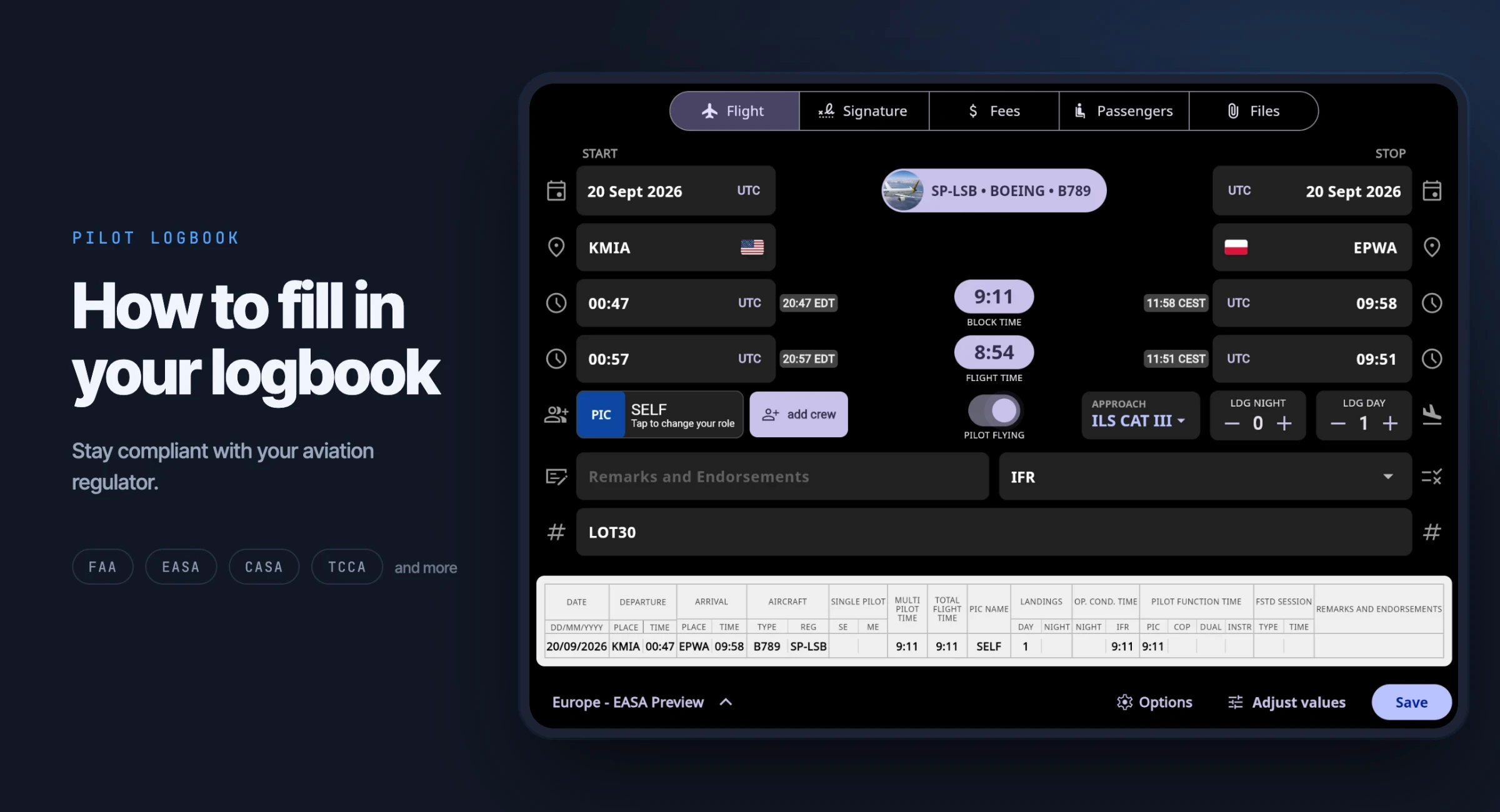
Whatever the format, every entry follows the same order. Work from left to right and it takes about a minute.
Date of the flight.
Aircraft: type and registration, taken from the aircraft documents, not from memory.
Route: departure and arrival airfield, with off-block and on-block times.
Total time of the flight, calculated from those two times.
Your role: PIC, co-pilot, dual or instructor, and the name of the PIC.
Conditions: any night, IFR or instrument time.
Landings: day and night, counted separately.
Remarks: route details, training exercise, approaches flown, and the instructor's signature if it was a dual flight.
Make the entry the same day, while the times are still fresh. The sections below explain exactly what each authority expects in every column.
EASA logbook: how to fill it in
What to record
The standard EASA layout has 12 columns.
Date: the date the flight started, as dd/mm/yy.
Departure: place (ICAO code or airfield name) and off-block time in UTC.
Arrival: place and on-block time in UTC.
Aircraft: make, model and variant (for example C172S), plus the registration.
Single-pilot or multi-pilot time: for single-pilot operations, tick SE (single-engine) or ME (multi-engine); some logbooks record the time here instead of a tick. For multi-pilot operations, enter the time in the multi-pilot column.
Total time of flight: for aeroplanes, from the moment the aircraft first moves to take off until it comes to rest at the end of the flight (block time), in hours and minutes.
Name of PIC: write "SELF" if you were the pilot-in-command; otherwise, write the PIC's name.
Landings: number of day and night landings.
Operational condition time: time flown at night and time flown under IFR.
Pilot function time: split the flight time into PIC, co-pilot, dual or instructor.
FSTD session: date, type of simulator and total session time. Simulator time is never added to your flight time totals.
Remarks and endorsements: instructor signatures, PICUS countersignatures, skill tests, proficiency checks, cross-country details and anything else that explains the entry.
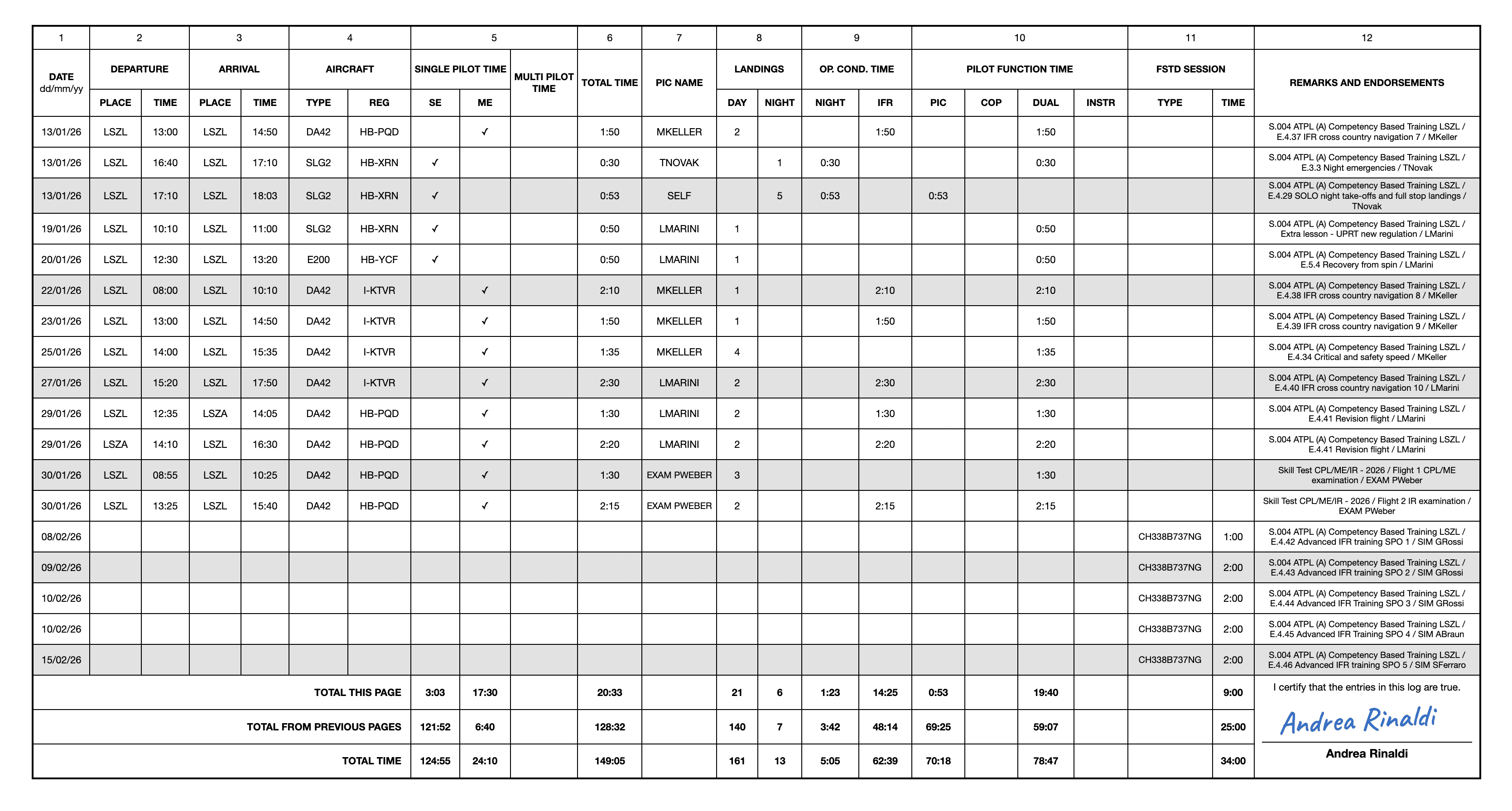
An EASA FCL.050 logbook page exported from FLYLOG.io. Each row is one flight, and page totals are carried forward at the bottom.
Good to know
All times are in UTC, in hours and minutes.
There is no separate cross-country column; note it in the remarks.
Dual flights must be signed by the instructor.
Carry page totals forward at the bottom of every page.
FAA logbook: how to fill it in
What to record
Under 14 CFR 61.51(b), each entry must contain:
General: date, total flight or lesson time, departure and arrival locations, aircraft type and identification, and the name of the safety pilot if one was required.
Type of experience or training: solo, PIC, SIC, flight and ground training received, or simulator training.
Conditions of flight: day or night, actual instrument, or simulated instrument.
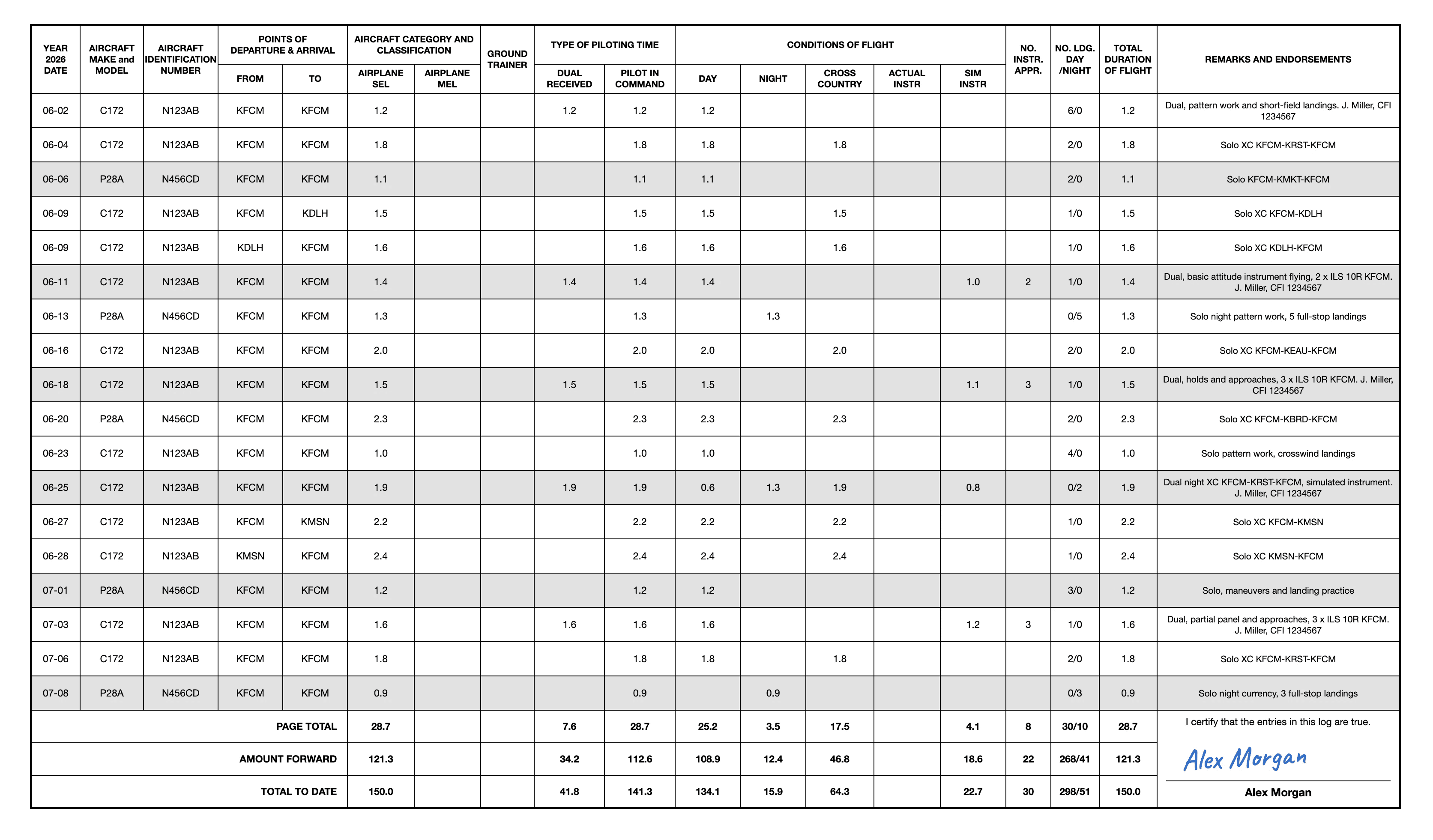
An FAA logbook page exported from FLYLOG.io. Flight time is logged in hours and tenths, with separate columns for PIC, cross-country, night and instrument time.
Good to know
Time is usually logged in hours and tenths (1.1, not 1:05).
For most certificates and ratings, cross-country time requires a landing more than 50 NM straight-line distance from the original departure point.
To count for instrument currency, log the location and type of each instrument approach.
Instructor endorsements for solo flight, practical tests and flight reviews must be in your logbook or training record.
Because the FAA prescribes no layout, several paper formats are in common use, such as the Jeppesen and ASA logbooks. All are valid as long as the 61.51 content is there.
Block time or airborne time?
This is the most common source of wrong totals. Airborne time runs from take-off to touchdown. Block time runs from the moment the aircraft first moves for the purpose of flight until it comes to rest after landing, so it includes taxi. Both EASA and the FAA define loggable flight time for aeroplanes as block time.
If you log airborne time by mistake, every entry is a few minutes short, and over a career that adds up to a meaningful number of missing hours. Note the off-block and on-block times for every flight and let those two times define the total.
Logging your pilot function correctly
PIC: you were the designated pilot-in-command. Under FAA rules, you may also log PIC when you are the sole manipulator of the controls of an aircraft you are rated for.
Co-pilot (SIC): you acted as co-pilot on an aircraft or operation requiring more than one pilot.
Dual: you received instruction. The instructor must sign the entry.
PICUS (EASA): you performed the PIC's duties under the commander's supervision. Log it as PIC and have the commander countersign.
Instructor: time spent giving instruction, which also counts as PIC.
Common mistakes
Mixing local time and UTC within the same logbook.
Logging airborne time instead of block time.
Treating EASA IFR time as FAA instrument time when converting a license. EASA logs time flown under IFR; the FAA logs only time flown solely by reference to instruments.
Missing instructor signatures on dual flights.
Adding simulator time to total flight time.
Arithmetic errors when carrying page totals forward.
How to correct a mistake
Never use correction fluid or erase an entry. Strike through the error with a single line so it stays readable, write the correct value next to it, and add your initials and the date. If page totals have already been carried forward, add a correcting entry and explain it in the remarks.
Paper or digital?
Both are accepted by most authorities, as long as the required data is recorded and can be presented on request. The difference is what happens after the entry is made: a paper logbook stores your flights, while a digital logbook works with them.
More than a record of flights
Fewer errors: totals are calculated automatically and entries are checked for inconsistencies, so there is no arithmetic to carry forward from page to page.
Currency limits: FLYLOG.io sets your currency requirements based on your selected authority and your ratings, tracks your recent experience against them, and shows when your currency is about to lapse.
Medical, license and rating expiry: store your certificates with their validity dates and get a reminder before anything expires.
Flight time limitations: see your flight hours over the relevant periods against the limits that apply to you, before you exceed them.
Signatures: instructors and examiners can sign entries directly on your phone or tablet.
Less typing: flights can be imported automatically instead of entered by hand, and years of paper records can be digitized with the Paper Logbook Scanner.
Insight: totals and analytics by aircraft type, pilot function or period, plus a ready-made pilot CV for job applications.
Always with you: works offline and syncs across phone, tablet and web. It cannot be lost, damaged or left in the aircraft.
One record, any format
In FLYLOG.io, you set your licensing authority once in your account, and its format becomes your default. You enter each flight once, and when a school, an employer or a second authority needs a different layout, you export the same records in that format:
EASA: the standard FCL.050 layout, a variant with a separate PICUS column, and a version including your custom fields.
FAA: layouts compatible with the most common US paper logbooks (Jeppesen Professional, ASA SP-6, SP-30 and SP-57), plus a summary report with the totals needed for FAA Form 8710-1.
UK CAA: FCL.050 and CAP 407 layouts.
Worldwide: formats for pilots across the globe, including CASA (Australia), TCCA (Canada), DGCA (India), GCAA (UAE), SACAA (South Africa), ANAC (Brazil) and CAAC (China).
Flight training: a layout compatible with the CAE logbook format, widely accepted because CAE is one of the world's largest flight training organisations.
Other exports: CSV and XLSX, a pilot CV and an aircraft totals summary.
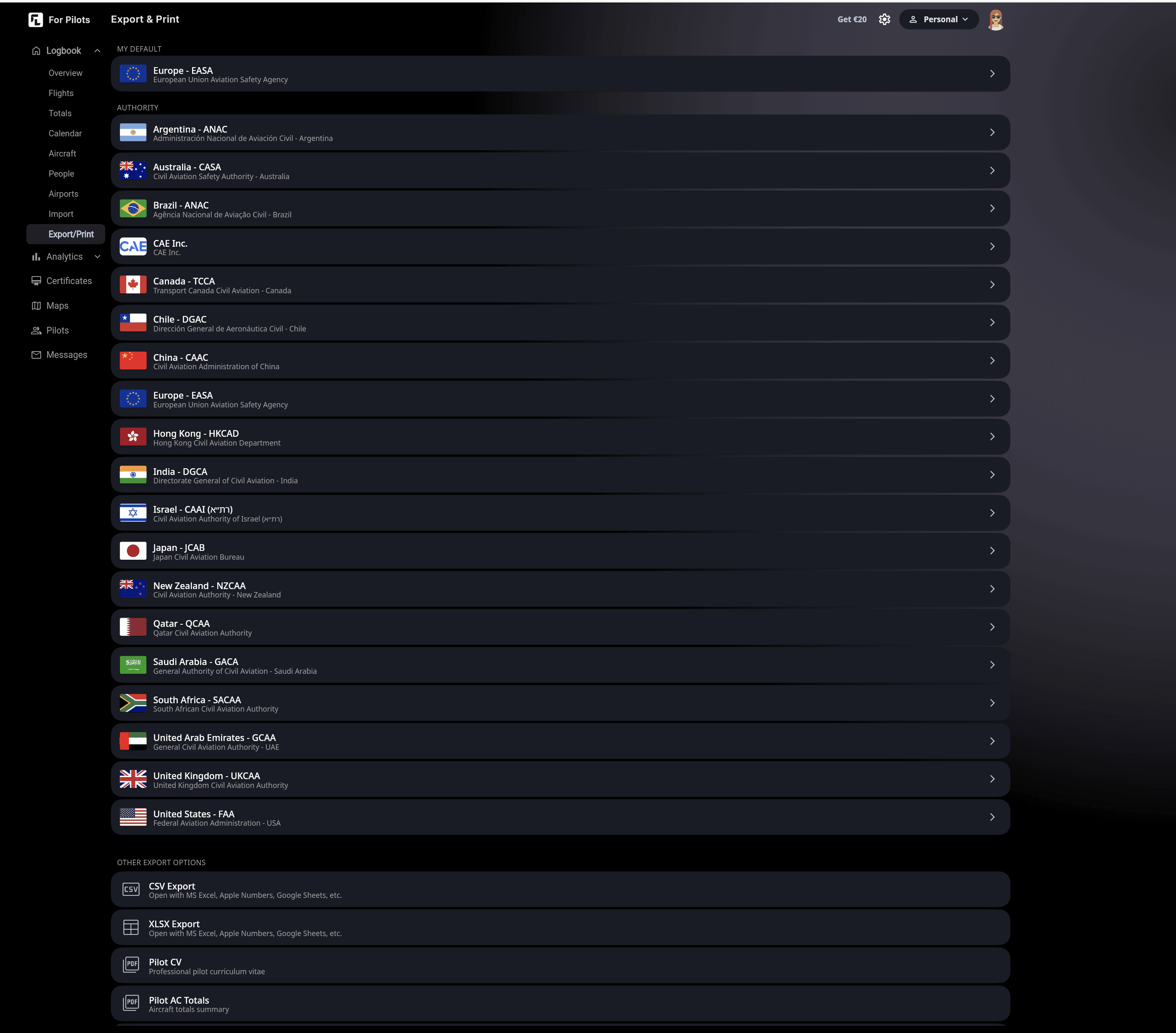
This matters when you convert a license, train in one country and fly in another, or apply to an airline abroad: the same records, exported in a different format, with no retyping.
💡 Keep in mind that an export changes the layout, not the rules: check that the times you logged meet the definitions of the authority receiving them, for example for instrument time.
Start for free or compare plans.
FAQ
How do I fill out a pilot logbook?
Record each flight in one row: date, aircraft type and registration, departure and arrival with times, total flight time, name of the PIC, landings, night and instrument time, and your pilot function. EASA pilots use the FCL.050 layout; FAA pilots record the content required by 14 CFR 61.51 in any layout.
Do I have to log every flight?
Under EASA, yes. Under the FAA, only flights used to meet certificate, rating, review or currency requirements, although logging everything is strongly recommended.
Which logbook format should I use?
The one your licensing authority expects. For EASA pilots, that is the FCL.050 layout. The FAA has no mandatory layout, so any format containing the 61.51 content is valid. f you hold licenses from more than one authority, keep a single digital record, set your main authority as the default and export the other formats when needed.
Should I use UTC or local time?
EASA expects UTC. The FAA does not prescribe either, but you should stay consistent.
What counts as flight time?
For aeroplanes, from the moment the aircraft first moves for the purpose of taking off until it comes to rest after landing.
How do I log simulator time?
In the FSTD column (EASA) or as simulator training (FAA), always separate from flight time.
Can I use pencil?
No. Entries should be made in ink or indelible pencil.
How soon after a flight should I fill in my logbook?
As soon as practicable. Same-day entries prevent errors and forgotten details.
Is a digital logbook legally accepted?
In most jurisdictions, yes, provided it contains the required data and you can produce it on request, often as a signed printout. Check with your authority if in doubt.





